The shop-floor system for
SAP S/4HANA® Cloud Public Edition

Plan, execute, verify and act in one app. Issues surface as they happen, each with a proposed fix, for plant managers, planners, supervisors and operators.

Book a demo
The AxiFloor Order Cockpit for production order 1002110, BIKE-ROAD in plant 3510: the order data, quantities planned 5 and produced 0, the status of materials, execution, quality and receipt, the tabs Overview to Execution Log, and Where this order stands below.

Meet AxiFloor

The plan, the station, quality and what needs attention, filmed in the app on a demo system running SAP S/4HANA Cloud Public Edition. Some factory scenes are AI-generated.

One app from the plan to the finished order. Planners sequence the week inside the shifts, operators run and time each job at the station, quality is checked on the same order, and anything that goes off plan shows up within minutes with its cause and the next step, on SAP S/4HANA Cloud Public Edition, while keeping its clean core intact.

Plan

Each work centre’s orders sequenced inside its shifts.

Execute

Operators start, time and confirm work at the station.

Verify

Results per characteristic and the usage decision, on the same order.

Act

Every issue arrives with its cause, its impact and what to do about it.

Sequence the week
in one click

Optimize lays out each work centre’s orders inside its shifts, with no overlaps. Move an order by hand when you know better, then save the plan back to SAP S/4HANA.

  • Week, day and monthOne work centre’s orders on the calendar, the weekend greyed.
  • Inside the shiftsOptimize keeps each order inside the work centre’s shifts.
  • Moved by handDrag an order; Optimize leaves it where you put it.
  • Save PlanA draft until you save it to SAP S/4HANA.

Run the job
at the station

Operators start and stop each operation on the tablet, so its time comes from the clock. They confirm good quantity and scrap in one step, issue the operation’s materials, and report a breakdown or a defect from the same screen.

The AxiFloor Operator Station at work centre BK-WELD, plant 3510, on production order 1002149, Road bike Aero 700C, operation 0010 Weld frame: the clock running at 0:02:30 with Stop & confirm and Pause, 1 PC to confirm, and the operation's six components: frame powder coat and saddle backflushed, the tube set, wheels, groupset and handlebar issued by hand; then Record Confirmation, Scan, Report Breakdown and Report Defect.
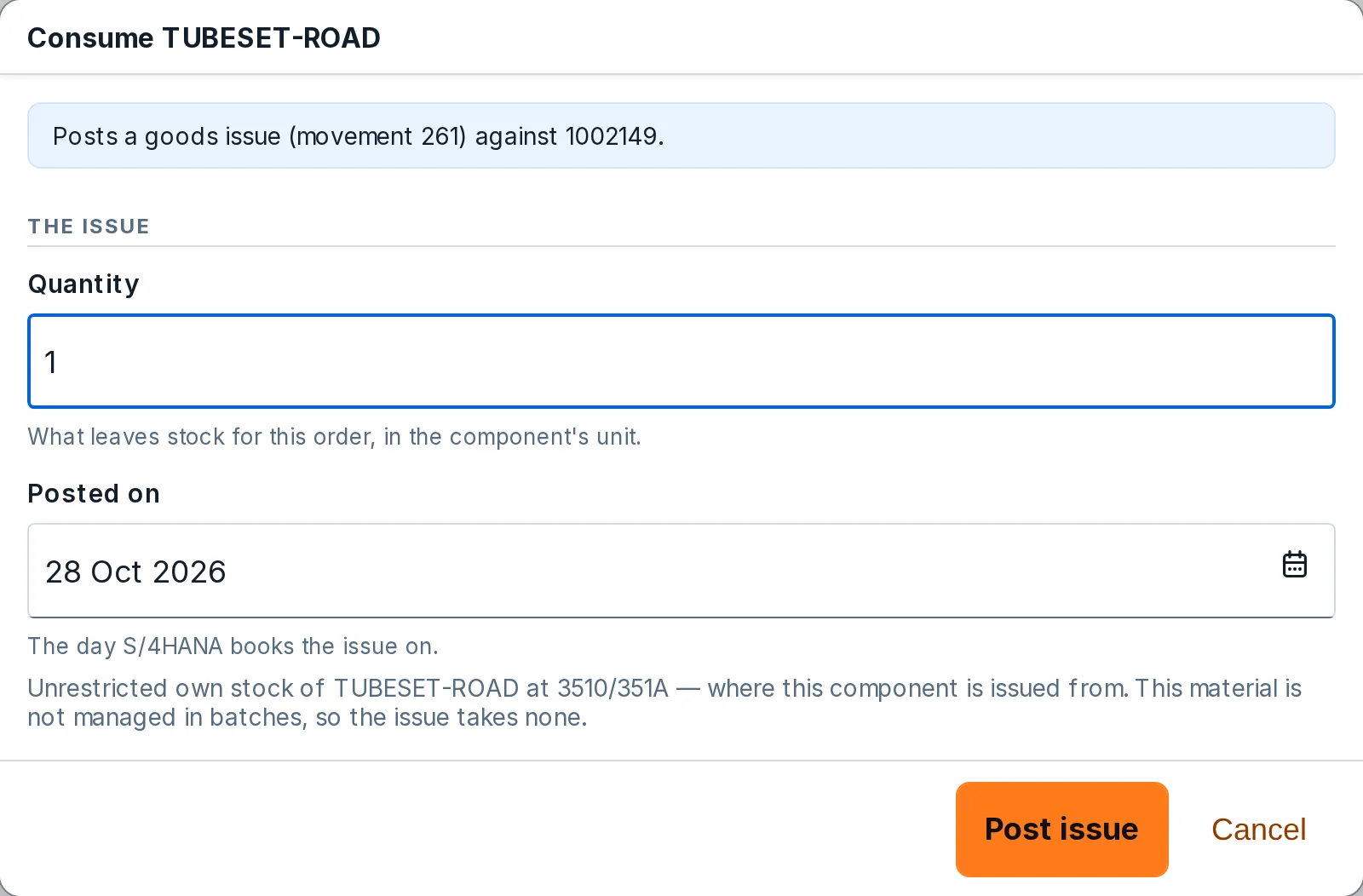
Consume TUBESET-ROAD, a manual component of order 1002149: it posts a goods issue (movement 261) against the order, with the quantity, 1, the posting date, and Post issue or Cancel.
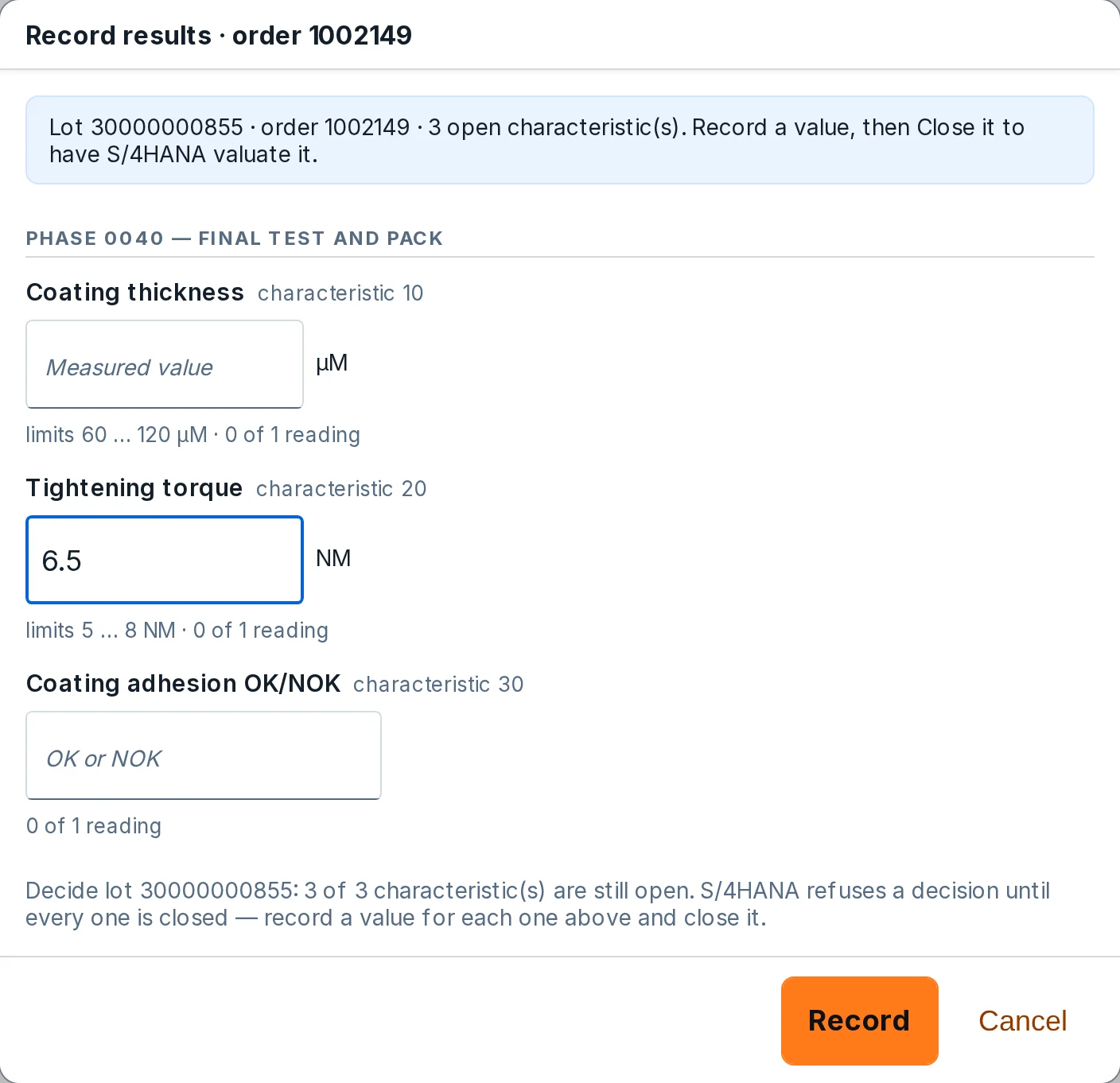
Record results for order 1002149, inspection lot 30000000855, phase 0040 Final test and pack: coating thickness with limits 60 to 120 µm, tightening torque with limits 5 to 8 NM and 6.5 being entered, and coating adhesion OK or NOK, with Record and Cancel.
Stop & confirm on operation 0010 of order 1002149: the quantity, 1 PC, and the clock's time, 0:02:41 from 17:27 to 17:30, booked as machine time; final, this completes the operation; Confirm or Cancel.
  • Start and stopThe clock on the operation times the job.
  • Good quantity and scrapConfirmed in one step and posted to SAP S/4HANA.
  • Materials per operationBackflushed ones post with the confirmation; manual ones are consumed from the station.
  • Breakdowns and defectsReported from the station, on the same order.

See what needs
attention now

Every issue at the plant, ranked, each with its cause, its impact and one next step. Next steps take each order to its next action; Coming up shows the next 72 hours.

The AxiFloor Manufacturing Overview for plant 3510, refreshed every 5 minutes. Needs attention now: order 1002105 is short of GROUPSET-MTB (critical), order 1002110 is late by 1 day (high) and BK-WELD is over capacity today (high), each with its cause, its impact and a button for the next step. Next steps: orders 1002141 and 1002142 are fully delivered with time over plan, to review before closing, and order 1002143 is ready to close.
  • Ranked by urgencyCritical first, each with the reason for its rank.
  • Cause and impactWhat caused it and what it holds up.
  • Next stepsThe routine next step for each order, with the app where it is done.
  • Coming up in 72 hKnown conditions for the next 24, 48 and 72 hours.

Close each order
with the evidence

Order Closing puts every operation, goods issue, goods receipt and inspection lot next to its plan. Anything off plan is explained before Set TECO closes the order in SAP S/4HANA.

AxiFloor Order Closing at plant 3510: the delivered bike orders 1002142 to 1002146, each with its stage, product, batch, planned and confirmed quantity and status.
AxiFloor Order Closing for production order 1002142, BIKE-ROAD, 2 PC confirmed, delivered: the banner says one deviation is to be explained at Set TECO, operation 0030 time +15%; the operations Weld frame, Powder coat frame, Assemble bike and Final test and pack each show planned and actual quantity and time, and Assemble bike carries a time 15% over chip (2.25 h planned, 2.583 h actual), with Set TECO, Order Confirmation, Order Cockpit and Refresh.
  • OperationsQuantity and time of each operation against its plan.
  • MaterialsEach goods issue, and whether the plan knew about it.
  • Receipt and qualityWhat came in, and each lot’s usage decision.
  • Set TECODeviations are explained first, then the order is closed.

Easy to start,
quick to go live

No custom objects, no modifications and nothing to transport: AxiFloor works through the standard released SAP S/4HANA APIs. Your ERP team sets up one communication user and the standard arrangements; we run the rest with you, from the first workshop to the first orders on the floor.

  • Standard APIs onlyNo Y or Z objects, no modifications.
  • What your ERP team doesOne communication user and the standard communication arrangements.
  • Three steps, togetherProcess fit workshop, set-up on your system, shop-floor go-live.
  • Clean coreThe ERP stays the system of record; your SAP S/4HANA core stays untouched.

Book a demo

We show AxiFloor on a real SAP S/4HANA Cloud Public Edition system and answer your questions.

What happens next

  1. We reply by email to set a time.
  2. We show AxiFloor on a real SAP S/4HANA Cloud Public Edition system, on a process like yours.
  3. You get an honest answer on fit for your plant.

Or write to ricardo.silva@ristantis.com

AxiFloor runs on SAP S/4HANA® Cloud Public Edition today.

Your request goes to Ristantis, which arranges the demo; it is kept for 12 months.